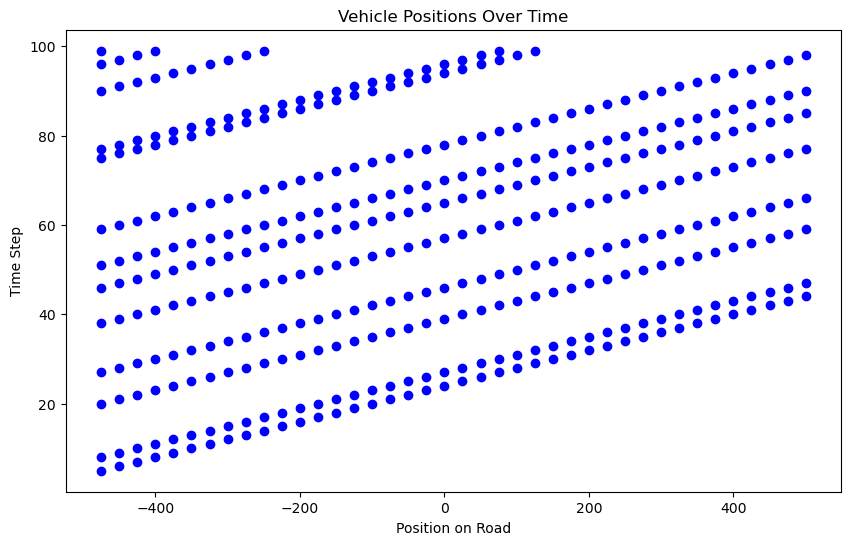
Let’s create a very simple infinite lane model, with some distance before and behind ego-vehicle. It is populated by vehicles all driving at the same speed. We can step time forward, which moves all vehicles some distance. Sometimes vehicles appear at the beginning of the stretch of road, and vehicles also disappear, when they reach the end of the modeled stretch.
def run_simulation(lane: Lane, duration: float, dt: float):"""Run the simulation for a given duration with time step dt.""" time =0 positions_over_time = []while time < duration: lane.step(dt) positions_over_time.append(list(lane.vehicles)) time += dtreturn positions_over_timelane = Lane( speed=25, arrival_rate=0.15, minimum_distance=32# Minimum distance calculated)# Run simulationsimulation_duration =100# Total duration of the simulationtime_step =1# Time step for the simulationpositions_over_time = run_simulation(lane, simulation_duration, time_step)# Visualizationplt.figure(figsize=(10, 6))for t, positions inenumerate(positions_over_time): plt.plot(positions, [t] *len(positions), 'bo')plt.xlabel('Position on Road')plt.ylabel('Time Step')plt.title('Vehicle Positions Over Time')plt.show()
Three-Lane Highway Setup
In this three-lane highway setup, we have designated different lanes for varying speeds to ensure smooth traffic flow and safety. The slow lane is intended for vehicles traveling at lower speeds, the middle lane for moderate speeds, and the fast lane for higher speeds. Each lane has an associated speed limit in miles per hour (mph), which has been converted to meters per second (m/s) for calculation purposes. The stopping distance is computed based on typical deceleration rates to ensure safe following distances between vehicles.
Lane
mph
Approx m/s
Approx Stopping Distance (meters)
Slow Lane
55
25
32
Middle Lane
65
29
43
Fast Lane
75
34
59
In this setup, the slow lane is suitable for vehicles traveling at approximately 55 mph (25 m/s), requiring a stopping distance of around 32 meters. The middle lane accommodates vehicles traveling at around 65 mph (29 m/s), with a stopping distance of about 43 meters. The fast lane is designed for vehicles moving at higher speeds, approximately 75 mph (34 m/s), necessitating a stopping distance of around 59 meters. This structured arrangement promotes safer driving conditions and efficient traffic management by aligning vehicle speeds with appropriate stopping distances.
Initialize self. See help(type(self)) for accurate signature.
from matplotlib.animation import FuncAnimation, PillowWriterfrom IPython.display import Imagefrom IPython.display import HTML
# Create Highway instancehighway = Highway()# Run simulation and create GIFduration =100# Total duration of the simulationdt =1# Time step for the simulationfig, ax = plt.subplots(figsize=(12, 3))frames =int(duration / dt)def update(frame): highway.step(dt) ax.clear() ax.set_xlim(-Lane.L /2, Lane.L /2) ax.set_ylim(-1, 3) ax.set_yticks([0, 1, 2]) ax.set_yticklabels(['Slow Lane', 'Middle Lane', 'Fast Lane']) ax.plot(highway.slow_lane.vehicles, [0] *len(highway.slow_lane.vehicles), 'bo', label='Slow Lane') ax.plot(highway.middle_lane.vehicles, [1] *len(highway.middle_lane.vehicles), 'go', label='Middle Lane') ax.plot(highway.fast_lane.vehicles, [2] *len(highway.fast_lane.vehicles), 'ro', label='Fast Lane')anim = FuncAnimation(fig, update, frames=frames, repeat=False);
# Uncomment to save and check:# anim.save("highway.gif", writer=PillowWriter(fps=10))# plt.close(fig) # Close the figure to prevent display in the notebook# Image(filename="highway.gif") # Display the saved GIF in the notebook
# Show the animation in the notebook:HTML(anim.to_jshtml())